The dashboard
The React UI reads through the Dashboard API. Each menu item maps to an architectural layer — click through to explore.
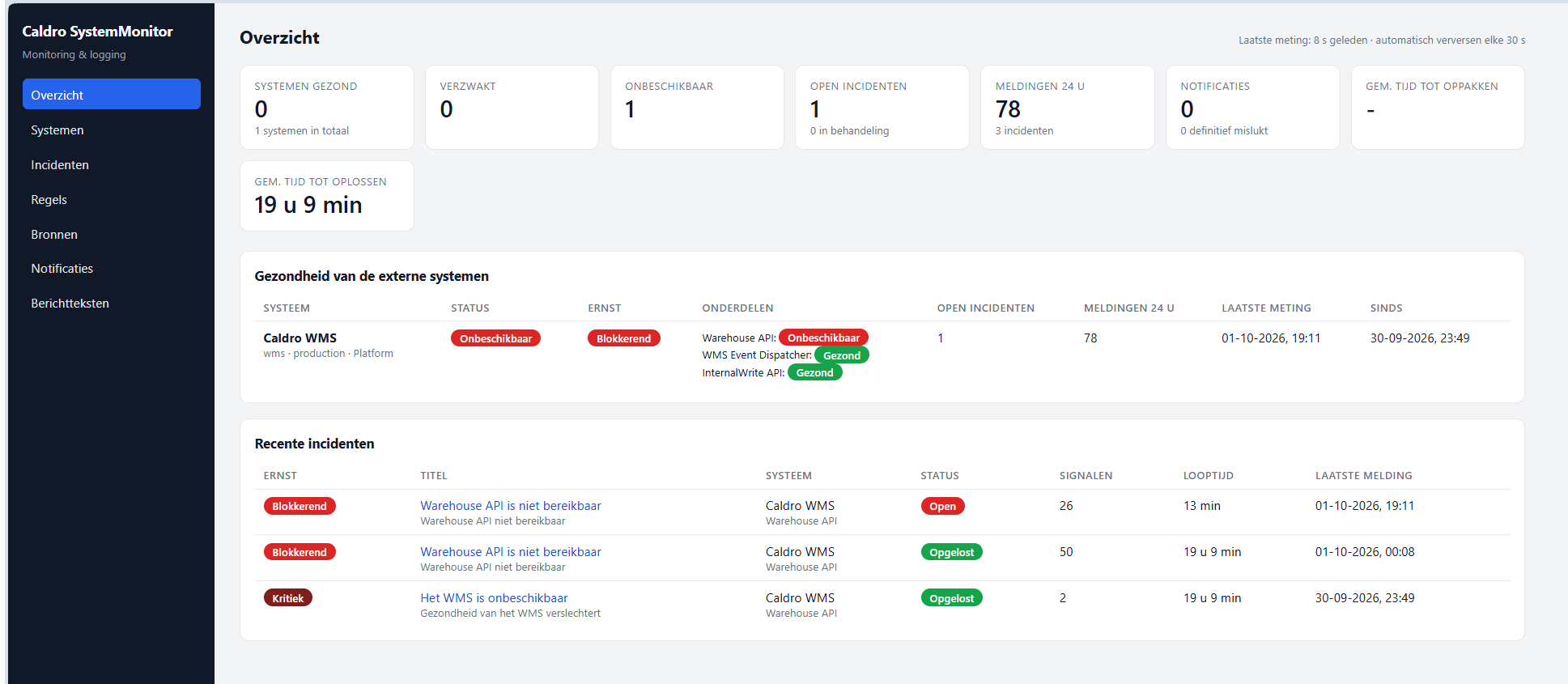
Overzicht (Overview) — the entry point. Shows the health state of every system and recent incidents at a glance. Caldro WMS will turn Onbeschikbaar when a blocking incident fires.
Systemen — system health
One card per system, coloured by its current HealthState. Drill down to see which
applications are Unhealthy, Degraded or Healthy.
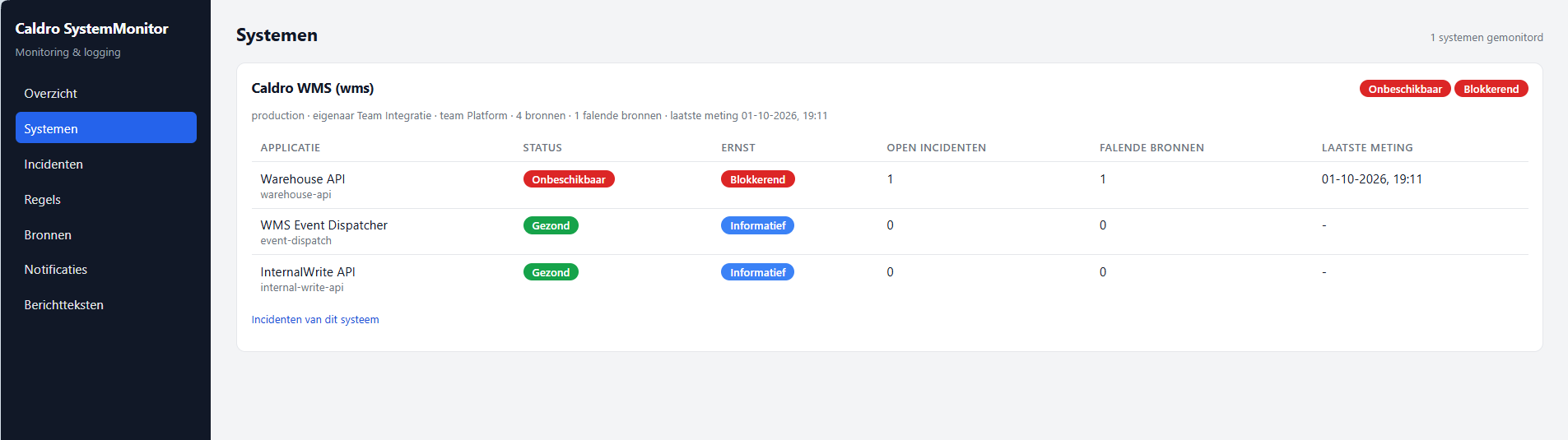
The Rules engine writes health_states into MongoDB; the Dashboard reads them live.
Incidenten — incident list
A deduplicated, suppressible timeline of incidents grouped by correlation key. Each row shows severity, status, duration, signal count and the owning team.
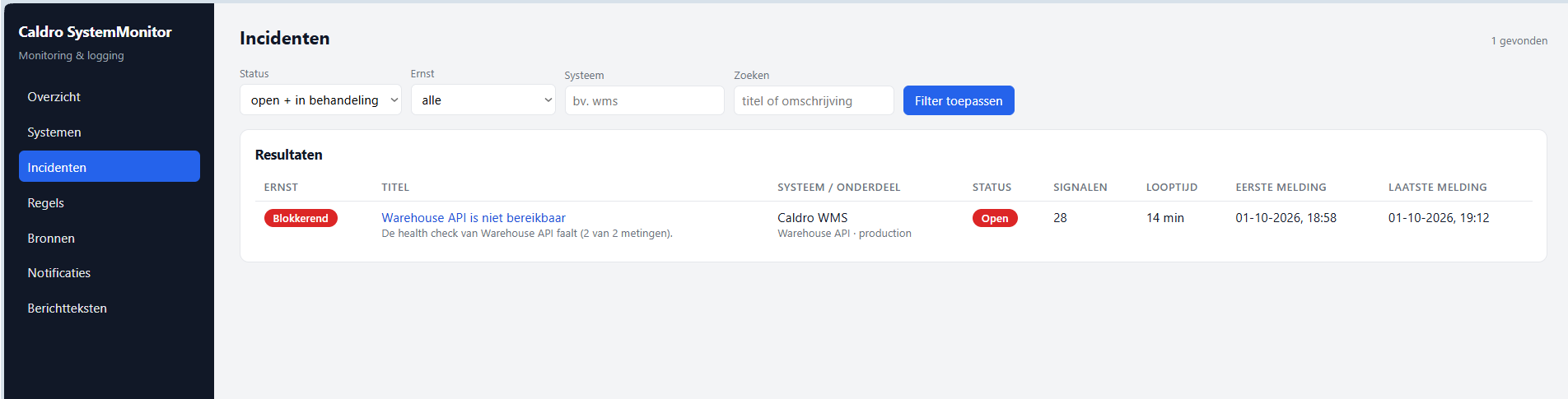
Signalen met dezelfde correlatiesleutel ({systemKey}:{applicationKey}:{ruleKey})
worden samengevoegd tot één incident.
Incident detail — drill-down
Open an incident to see the signal, every measurement that fed it, the raw error messages, the timeline and recommended actions. You can acknowledge, resolve or add a note.
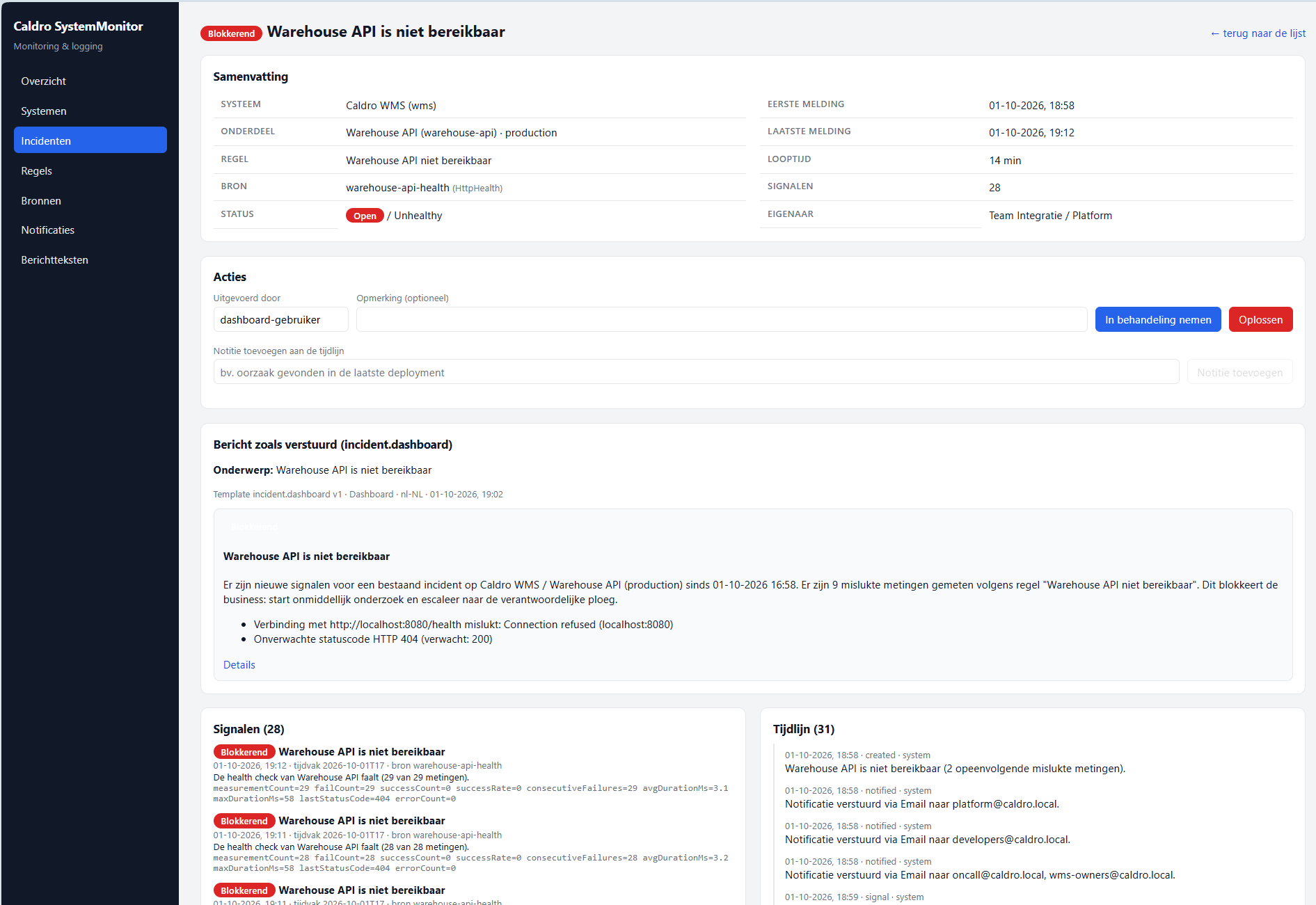
Resolution sets the incident to Resolved, the health jumps back to
Gezond, and (with notifyOnResolve) a follow-up e-mail is sent.
Regels — rule configuration
Rules are data, not code. Configure the trigger (threshold, state change, pattern, absence, aggregation), an optional condition tree, and the outcome (severity, health status, templates). Every rule gets a Validate → Dry-run step before saving.
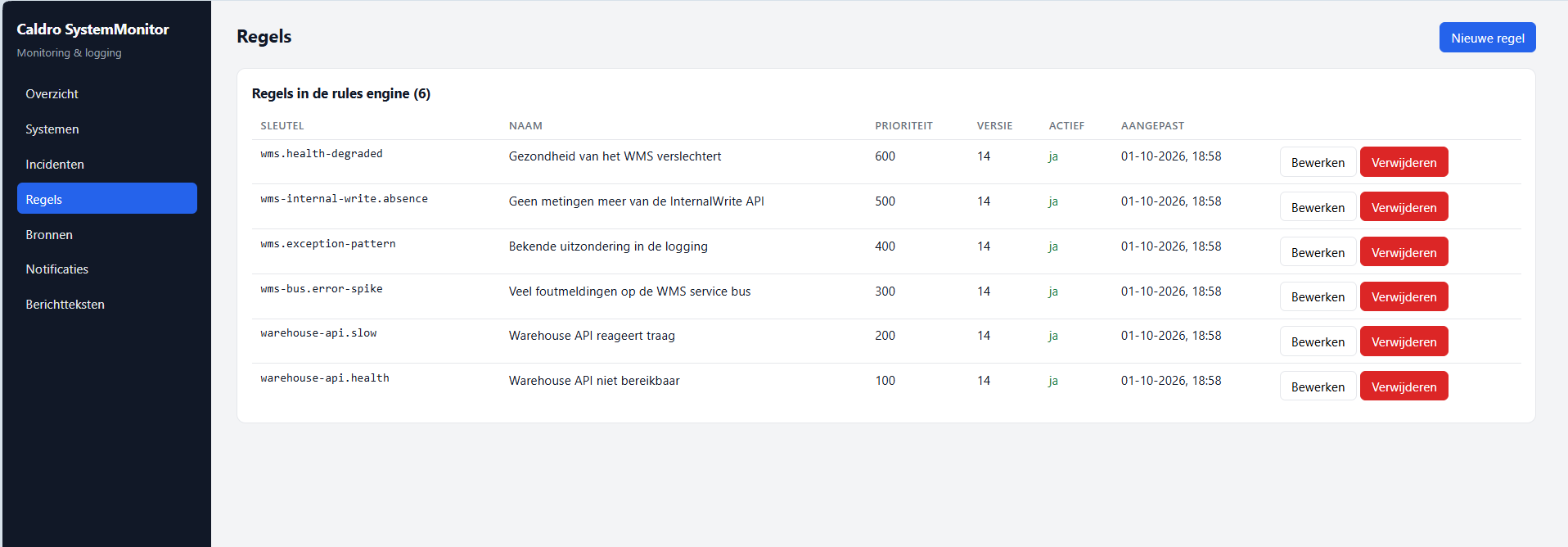
De rules engine leest deze configuratie uit MongoDB en triggers er zonder deployment.
Bronnen — sources & targets
Manage the systems and endpoints the worker layer should monitor: HTTP health-check URLs, polling intervals, timeout, expected status codes and the severity assigned on failure.
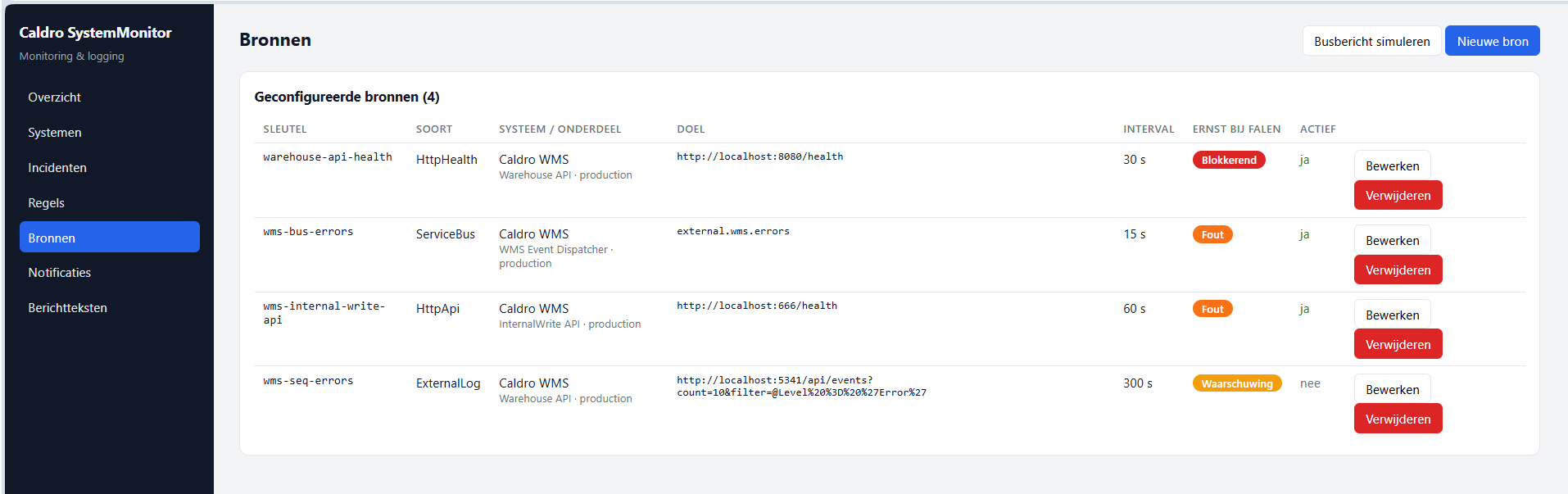
Each target is a probe the HttpHealthCollector or bus listener picks up.
Notificaties — notification routing
Build subscriptions that decide who gets what, on which channel, with how much evidence attached,
how often (maxNotificationsPerHour) and when to escalate.
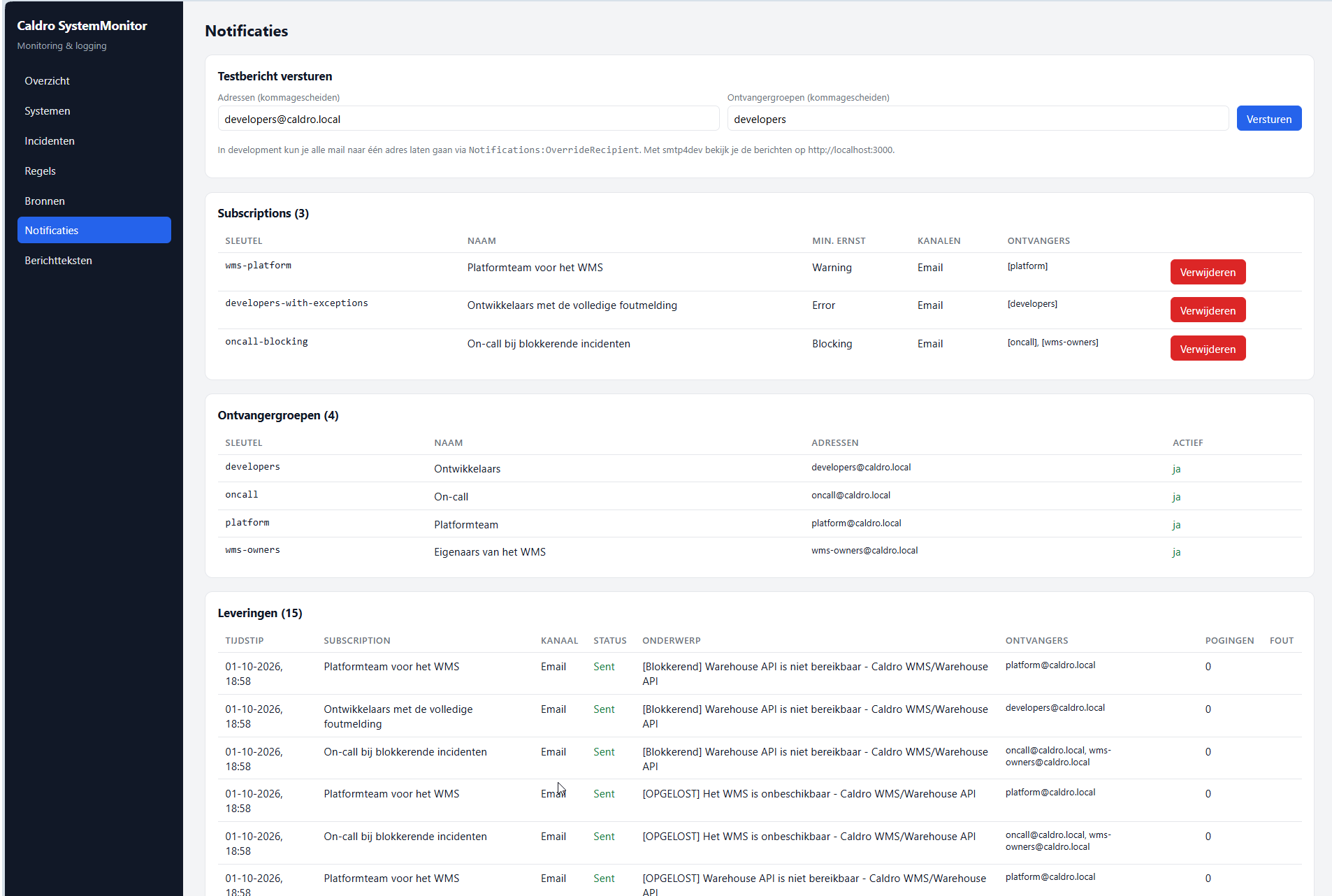
Een escalatie na escalateAfterMinutes breekt de onderdrukking door.
Berichtteksten — templates & labels
Edit the Scriban templates and text labels per key + locale + channel.
Use Preview with example incident to see the rendered e-mail immediately.
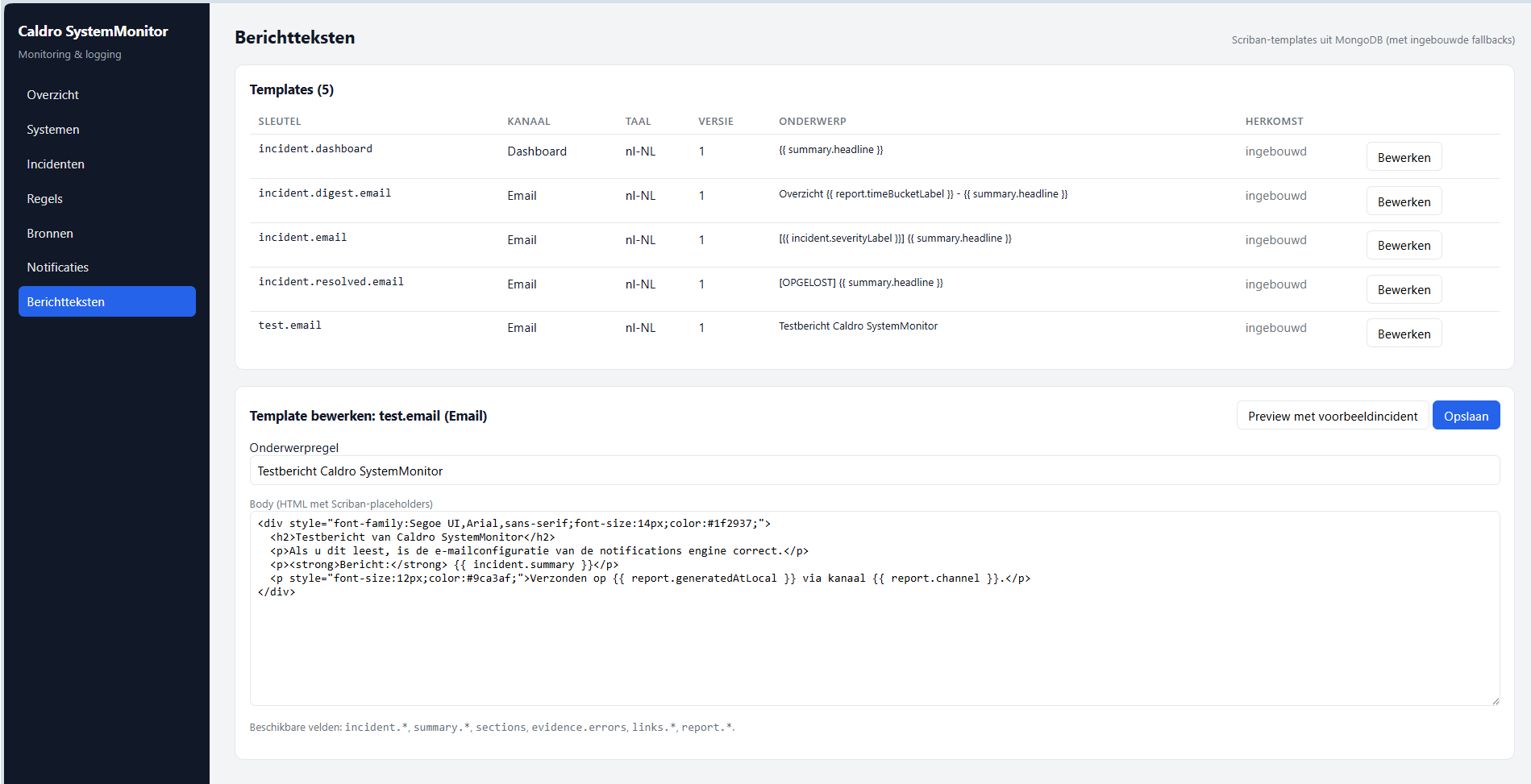
Alle tekstlogica woont in de interpretatielaag — één plek, consistente berichten.
How it works
Every item flows through an ordered pipeline of layers. Each layer reads its input from MongoDB and writes its output back, with a lightweight message bus (also on MongoDB) signalling the next layer to start.
┌────────────────┐   evidence    ┌──────────────┐   rules   ┌──────────────┐   templates ┌─────────────┐
│  WORKER        │ ───▶          │  RULES       │ ───▶      │  INTER-      │ ───▶        │  NOTIFI-    │
│  layer         │               │  ENGINE      │           │  PRETATION   │             │  CATIONS    │
│                │               │              │           │  layer       │             │  engine     │
│ HTTP probes    │               │ regels uit   │           │ templates +  │             │ delivery    │
│ bus, logs      │               │ Mongo        │           │ teksten      │             │ outbox      │
└────────────────┘               └──────────────┘           └──────────────┘             └─────────────┘
       │                            │                             │                          │
       └────────────────────────── MongoDB ───────────────────────┴──────────────────────────┘
                   (evidence, signals, incidents, health, templates, texts, deliveries, bus)
                            ↳
                            │
                     ┌────────────┐
                     │ Dashboard  │  (read + manage via API + React UI)
                     │ API + UI   │
                     └────────────┘
The four layers
Each layer is an independent microservice with its own responsibilities. All configuration lives in MongoDB so a functional administrator can change behaviour without a deployment.
Collector.Worker
Listeners on service busses, HTTP health checks/API-calls, and external logging.
Writes evidence to MongoDB and publishes systemmonitor.evidence.collected.
RulesEngine.Worker
Evaluates rules from MongoDB, creates Signal documents, deduplicates them
into Incidents by correlation key, and recalculates HealthState.
Interpretation.Api
Applies Scriban templates + text labels, enriches the model (owner, actions, links,
impact) and renders per channel. Results are cached in interpreted_messages.
Notifications.Worker
Matches subscriptions, fills the delivery outbox, fetches rendered messages from the interpretation layer and sends them via SMTP with retry/backoff. Six failures → DeadLettered.
| Layer | Writes to MongoDB | Reads from MongoDB | Publishes |
|---|---|---|---|
Worker | evidence | targets | systemmonitor.evidence.collected |
Rules engine | signals, incidents, health_states | rules, evidence | systemmonitor.incidents.changed |
Interpretation | interpreted_messages | incidents, signals, templates, texts | — |
Notifications | deliveries | subscriptions, recipient_groups, interpreted_messages | — |
Walk-through: the Warehouse API is unreachable
A live end-to-end scenario, step by step through every layer. It is also automated as an
integration test: WarehouseScenarioTests.cs.
warehouse-api-health (URL
http://localhost:8080/health, interval 30 s, timeout 10 s) gets no response.
Worker collects evidence
HttpHealthCollector runs HttpProbe. No response within 10 s →
an evidence record with isSuccessful = false. A
systemmonitor.evidence.collected bus message is published.
Rules engine evaluates
RulesEngineHostedService picks up the bus message. Rule warehouse-api.health
has trigger.kind = Threshold with consecutiveFailures = 2. Two failed
measurements in a 15-minute window → the rule fires.
Deduplication into an incident
IncidentManager.RegisterAsync() looks up an open incident by the correlation key
wms:warehouse-api:warehouse-api.health. None exists, so a new Incident is
created (status Open) with a 30-minute suppression window.
HealthStateCalculator sets the health of wms to Unhealthy.
Interpretation renders the message
Notifications requests
GET /api/v1/interpret/incidents/{id}?channel=Email&locale=nl-NL. The interpretation
layer loads the incident, signals and evidence, applies template incident.email (nl-NL)
and text labels (severity.Blocking → "Blokkerend"), enriches the model with impact,
actions, metrics and links. Result is cached in interpreted_messages.
Notifications sends the e-mail
SubscriptionMatcher finds subscription oncall-blocking (min severity
Blocking) and developers-with-exceptions (min severity Error, raw payload).
Each channel writes a delivery to the outbox and sends via SMTP. The timeline gets a
"Notification sent via Email" entry.
What the recipient sees:
Onderwerp: [Blokkerend] Warehouse API is niet bereikbaar - Caldro WMS/Warehouse API

Body:
[BLOKKEREND · ONBESCHIKBAAR]
Warehouse API is niet bereikbaar
Caldro WMS / Warehouse API (production)

Er is een nieuw incident vastgesteld sinds 24-09-2026 16:28.
Er zijn 2 mislukte metingen gemeten volgens regel "Warehouse API niet bereikbaar".
Dit blokkeert de business: start onmiddellijk onderzoek en escalatie.

Foutmeldingen
  System.Net.Http.HttpRequestException: Connection refused (warehouse-api:8080)

Tijdlijn  16:28 created — Warehouse API is niet bereikbaar (2 opeenvolgende mislukte metingen).
Acties      controleer bereikbaarheid · bekijk logregels · verwittig on-call · volg runbook
Try it yourself
docker compose up --build, then:
- Open http://localhost:8082 → Overzicht →
Caldro WMSturns Onbeschikbaar after ~1 minute. - Open the incident → see the message, signals, error messages and timeline (Incident detail).
- View e-mails at http://localhost:3000 (smtp4dev): one to on-call + WMS owners, one to developers with raw payload.
- Check Notificaties for delivery status:
Sent, attempts and provider-id. - Resolve via the Oplossen button → incident goes Resolved, health returns to Gezond, resolution e-mail follows.
Rules are data, not code
The trigger, an optional condition tree, and the outcome are all stored in MongoDB. They are evaluated safely — no code or script is ever executed from the database.
{
  "key": "warehouse-api.health",
  "enabled": true,
  "priority": 100,
  "scope": { "applicationKeys": ["warehouse-api"], "environments": ["production"] },
  "trigger": { "kind": "Threshold", "windowMinutes": 15, "consecutiveFailures": 2 },
  "condition": null,
  "outcome": {
    "severity": "Blocking",
    "healthStatus": "Unhealthy",
    "title": "Warehouse API is niet bereikbaar",
    "summaryTemplate": "De health check van {applicationName} faalt ({failCount} van {measurementCount} metingen).",
    "messageKeys": ["incident.email", "incident.dashboard"],
    "runbookKey": "wms-warehouse-api-down"
  },
  "deduplication": { "keyTemplate": "{systemKey}:{applicationKey}:{ruleKey}", "suppressionWindowMinutes": 30 }
}
5 trigger types
Threshold, StateChange, Pattern, Absence, Aggregation.
Condition tree
and / or / not with field & operator — fully nestable.
Deduplication
Signals merge into incidents by correlation key with a suppression window.
Dry-run
Validate → Dry-run (60 min) → Save on every rule.
Reliability built in
The design avoids duplicate processing and message loss even with multiple instances.
Engine lock
IEngineLockRepository uses an atomic find-and-update on
engine_locks with a TTL. Only the lease owner runs the rules cycle — safe horizontal scaling.
At-least-once delivery
deliveries is an outbox. Pending → Sent, or
Failed/DeadLettered with exponential backoff after 6 attempts.
Replaceable message bus
bus_messages uses leasedUntilUtc + processedAtUtc
with a 7-day TTL. Swap in NATS/RabbitMQ/Kafka via IMessageBus — the rest stays the same.
Datum + uur
Every signal, incident and message carries a timeBucket (yyyy-MM-ddTHH in UTC).
The engine measures on, the dashboard groups on, digests are built on.
Key features
A small but complete platform. Four layers, one database, one dashboard.
Four layers
Worker, Rules engine, Interpretation, Notifications — each a separate microservice.
Configurable
All targets, rules, subscriptions, groups and templates live in MongoDB — editable in the UI.
Data-driven rules
No code in the database. Safe evaluation of triggers and condition trees.
Deduplication & suppression
Signals merge into incidents with a configurable suppression window and escalation.
At-least-once notifications
Outbox with retry, exponential backoff and dead-lettering.
Dutch messaging
Scriban templates + text labels per locale and channel, cached results.
Docker ready
docker compose up --build starts the full stack including Seq, mongo-express and smtp4dev.
Tested
75 unit tests + a full integration test on the warehouse scenario.
About this project
User-driven, not feature-driven. Built to explore clean architecture, event-driven design and configurable monitoring in a real end-to-end flow.
Don't write tools because you can, write them user-driven and start from actual needs. Think about what a user will do and what information they need to execute their action. You don't want to spend money on unused features.
SystemMonitor is platform-independent — .NET 8, MongoDB and Docker run anywhere,
on-prem or in any cloud, and the project comes with no costs and is free to use. The
architecture is organised in dependency-inverting layers: SharedKernel, Contracts,
Domain, Interfaces, Application and Infrastructure form the foundation;
the four layer-specific projects sit on top. The whole thing is runnable with Docker Compose or
stand-alone with dotnet run per host.
This is boilerplate code and needs further work to finalise. Considerations about the amount of data storage, retention & cleanups, placeholders for advanced text interpretation, and production-ready authentication are still open. Treat it as a starting point, not a drop-in appliance.
Feel free to download and modify — feedback and improvements are welcome.
Download the source
The full SystemMonitor solution — all four layers, the Dashboard API, the React UI, seed data, tests and documentation — in one archive.
Download SystemMonitor.zip